View our Release Page Need the IT installer? Get the .MSI
Support & Sales will be offline from December 24 at 12:00 pm and will return December 26 at 9:00 am (CDT) December 31 will also have shortened support hours ending at 12:00 pm and resuming January 1 at 9:00 am (CDT)

How to Release / Delete

PHDwin V3 License File / Unlock

Step 0 – IF in PHDwin V3

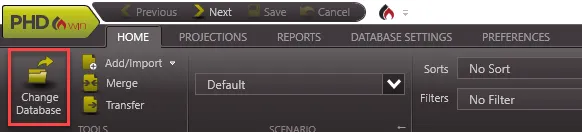
  1. Navigate to Home
  2. Click “Change Database”
  3. This will bring you back to the main splash screen.

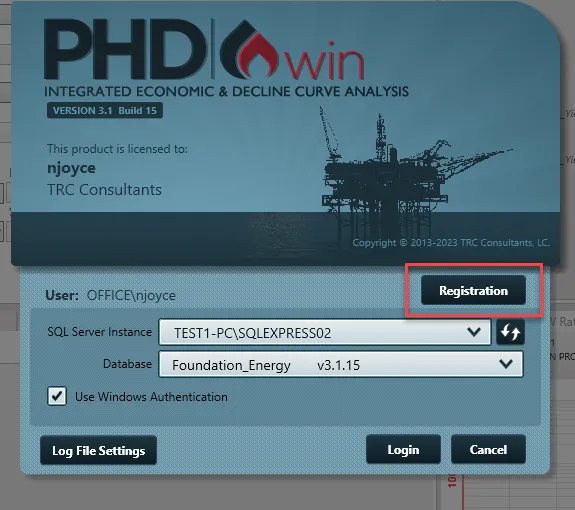
Step 1 – On the Splash Screen Hit "Registration"

  1. In the Splash Screen hit “Registration”
     
PHDwin Main Home Ribbon with Change Database Selected

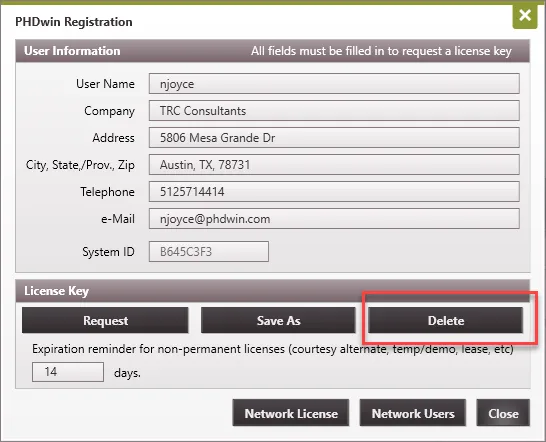
Step 3 - Releasing / Deleting a License File

1. Fill out all field forms.

2. Make sure System ID is populated.

3. Select Delete.

PHDwin Registration Window with Delete button highlighte

A single-user unlock license file allows a single individual to access PHDwin V3 on a single machine. Access to the software is limited to the computer on which the software is installed.

This is our recommended installation type. It takes the least amount of time, money, and compute resources to deploy.

The standard installation only requires the .exe application versus the .msi application for network deployments.

By releasing a license you forgo ownership of your existing perpetual install of PHDwin in a given machine. In order to get the license unlock back you may need to pay the cost of a new license unlock file.

Main Site Portal V3 Download PHDwin Support PHDwin Week
Explore PHDwin